
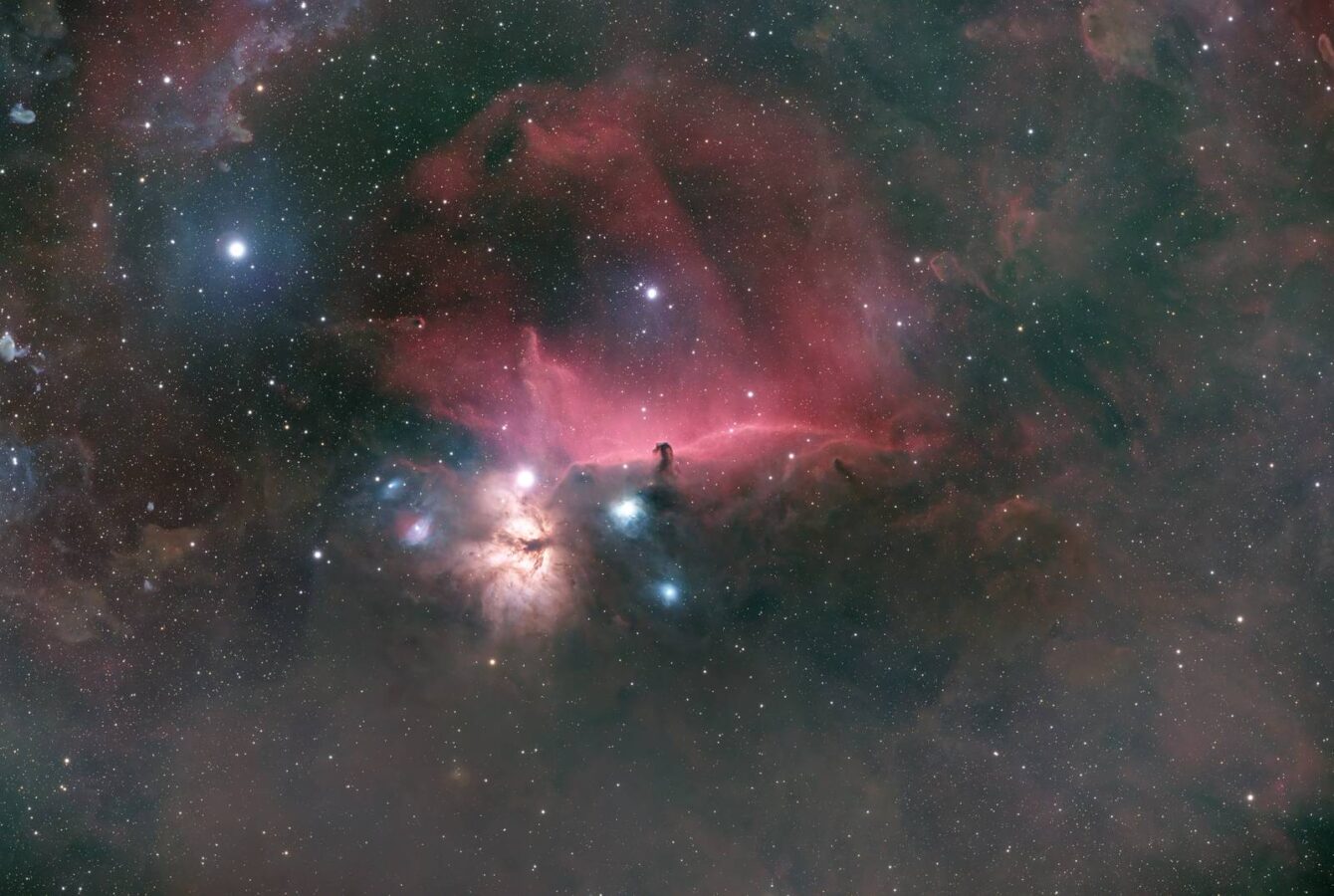
Horsehead Nebula
About this image
The Horsehead and Flame Nebula – A Favourite Region of Orion
One of my favourite and most striking astrophotography images is the Horsehead and Flame Nebula, located within the constellation of Orion.
Orion is an extraordinary region of the night sky, rich in interstellar dust, vast molecular clouds and glowing nebulae. It is an area of active star formation, where clouds of gas and dust create some of the most beautiful and recognisable structures in our galaxy.
The Horsehead Nebula (Barnard 33) appears as a distinctive dark silhouette against the glowing hydrogen emission of IC 434. Nearby, the Flame Nebula (NGC 2024) reveals intricate structures of dust and gas, illuminated by stars within the region.
This image was captured over two nights using my William Optics RedCat 51 and ZWO ASI2600MC camera, combining 110 broadband exposures with a further 110 exposures through an Optolong L-eNhance filter. The datasets were processed and combined in PixInsight, preserving the natural broadband colours while introducing additional hydrogen-alpha detail.
Image details
| Object type | HII region |
|---|---|
| Catalogue | IC 434, IC 434 – CED 55N |
| Constellation | Orion (Ori) |
| Observed | 2026 Nov 13 – 23:00 UTC |
| Location | Portsmouth, UK |
| Moon | Waxing Crescent – 17% illuminated – age 4.0 days |
| WordPress categories | Nebula |
Equipment
| Telescope | William Optics RedCat 51 |
|---|---|
| Camera | ZWO ASI2600MC Pro |
| Mount | Juwei 17 |
| Filter | Not recorded |
| Focal length | 250mm |
| F-ratio | f/4.9 |
| Pixel scale | Not recorded |
Acquisition
| Gain | Not recorded |
|---|---|
| Guiding RMS | <1.2 |
Processing notes
PixInsight – Horsehead & Flame Nebula RGB + L-eNhance Workflow
Equipment: RedCat 51, ZWO ASI2600MC
Data: 110 broadband RGB exposures + 110 L-eNhance exposures, captured over two nights.
Objective: Combine broadband RGB and narrowband Ha data while preserving natural star colours, the pink-purple Flame Nebula and additional hydrogen-alpha detail around the Horsehead.
Processing steps
1. StarAlignment: Open both integrated linear images. Use RGB as the reference and align the L-eNhance image. Rename the images RGB and LENHANCE.
2. DynamicCrop: Apply identical cropping to both images, removing registration borders.
3. DynamicBackgroundExtraction (DBE): Remove gradients separately from both images, avoiding background samples over nebulosity and dust.
4. ImageSolver and SPCC: Plate-solve and colour-calibrate the broadband RGB image only. Leave L-eNhance uncalibrated by broadband SPCC.
5. BlurXTerminator: Apply conservatively to both linear images to correct optical distortions and improve detail.
6. NoiseXTerminator: Apply noise reduction to both images while linear, preserving faint nebulosity.
7. GHS: Stretch both images separately using GeneralizedHyperbolicStretch, avoiding clipped blacks and saturated highlights.
8. CurvesTransformation: On the L-eNhance image, reduce the red channel and adjust the colour balance to tone down excessive Ha redness. This helps preserve the softer pink-purple RGB colours of the Flame Nebula when combining the datasets.
9. StarXTerminator: Remove stars from both stretched images. For RGB, enable Generate Star Image and Unscreen Stars. Rename the outputs:
– RGB_starless
– RGB_stars
– LENHANCE_starless
10. PixelMath – combine starless images: Use RGB as the dominant colour source, with a smaller L-eNhance contribution.
Formula (75% RGB / 25% L-eNhance):
0.75*RGB_starless + 0.25*LENHANCE_starless
Enable Create new image, select RGB colour space, disable Rescale result and name the output RGBHa_starless.
11. PixelMath – restore RGB stars: Recombine the original broadband RGB stars using Screen blending.
Formula:
1-(1-RGBHa_starless)*(1-RGB_stars)
Create a new RGB image named Horsehead_Final.
12. Final adjustments: Use CurvesTransformation for subtle contrast, saturation and colour balancing. Reduce star intensity if necessary, paying particular attention to Alnitak and its surrounding halo.
Final result
The finished image combines the natural broadband RGB colours and stars with additional narrowband emission detail. Reducing the L-eNhance redness before merging helps retain the Flame Nebula's softer pink-purple appearance, while the RGB star layer avoids introducing the L-eNhance star halos.
Note: The 75/25 combination blends all three colour channels rather than extracting pure Ha. The ratio can be adjusted to favour RGB colour preservation or stronger narrowband emission.
Posted from CityAstroLog.